Documentation
Projects and to-dos
Projects hold your to-dos, and a session is about one of them. The to-do list works the way Things does: Inbox, Today, Upcoming, Anytime, Someday and a Logbook, with headings inside each project.
Projects
Projects on the navbar opens every open project with its to-dos. A project has:
- a name, an optional short code (it appears on invoices) and a colour from a set of eight, which tints its sessions everywhere;
- an optional client, a rate and a billable switch (see clients and rates);
- headings that group its to-dos into sections;
- its own When, deadline, notes and tags;
- on the Mac, a folder, for the Claude Code add-on.
Completing or cancelling a project moves it to the Logbook and closes its open to-dos with it (you can keep them open instead). Archiving hides a project from the pickers without touching its history.
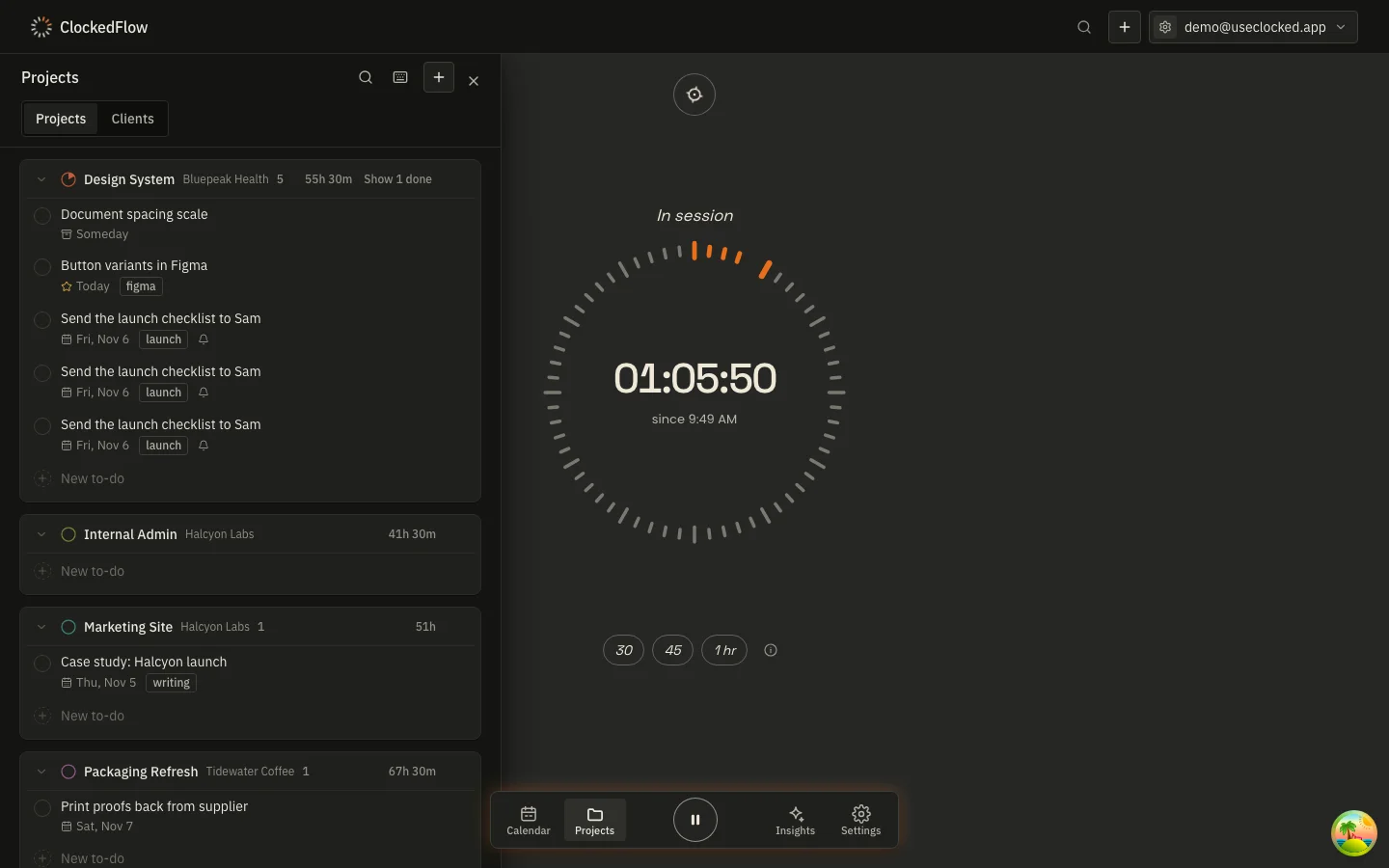
To-dos
A to-do is a line of text and, as you need them:
- When: a day, or Someday. A to-do with no When sits in Anytime (or the Inbox, if it has no project).
- This Evening: a Today to-do that belongs to the evening half of the list.
- Deadline: a calendar day. It never moves with time zones, and a to-do that is due today appears in Today whether or not it was scheduled.
- Checklist: sub-steps with their own tick boxes; the list shows how many are done (1/3).
- Tags: any words you like. The set of tags is whatever your open to-dos and projects carry.
- Repeat: every n days, weeks, months or years, on a schedule or after completion, optionally until a date. Completing one creates the next.
- Reminder: a time to be reminded.
- Notes.
Press + in the Projects header (or ⌘N) for Quick Entry, or type New to-do at the bottom of any section. Drag to-dos to reorder them, into a heading, or onto another project; ⇧⌘M moves the selection without the mouse.
The six lists
| List | What's in it |
|---|---|
| Inbox | To-dos with no project and no When. |
| Today | To-dos scheduled for today or earlier (a past When rolls forward), plus anything due today or overdue. Morning first, then This Evening. |
| Upcoming | To-dos scheduled for a later day, with deadlines and the previews of repeating to-dos on the days they'll fall. |
| Anytime | To-dos in a project with no When. |
| Someday | To-dos you've set aside. |
| Logbook | Done and cancelled to-dos and projects, newest first. |
To-dos and sessions
The composer on the record screen picks a project and one of its to-dos; Start records a session about it. The time lands on the project's calendar blocks and, through the project, on the client's invoice. The to-do's own page shows the time spent on it. Starting with nothing picked records a Misc. session and asks what it was about when you stop.
Finding things
With the Projects panel open, just start typing: Quick Find searches projects and to-dos. ⌘K anywhere searches pages, projects and clients. The full list of keys is on the shortcuts page.
Next: Clients and rates